
Scrapyard Bookmarks by gchristnsn
Scrapyard is a page-archiving bookmark manager suitable for heavy scrapbooking. With its friendly user experience and simple configuration it may be an excellent replacement for the legacy ScrapBook and even for the built-in bookmark manager.
192 Users192 Users
Extension Metadata
Screenshots

About this extension
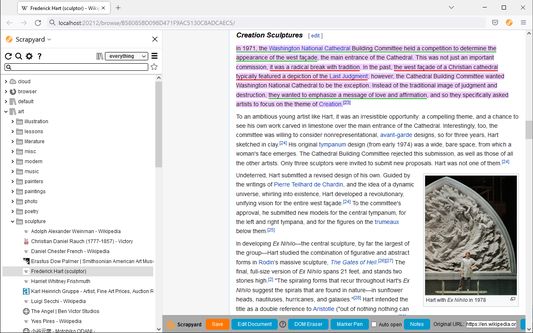
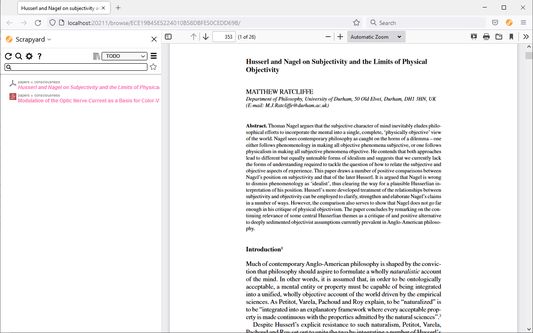
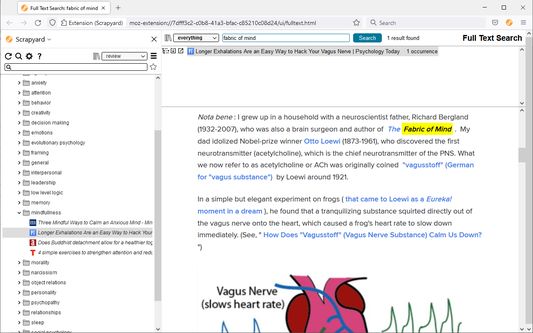
Scrapyard is a bookmarking extension where you can store and organize bookmarks, page fragments, complete HTML pages and PDF documents, or take notes. It is intended as a modern alternative to the legacy ScrapBook add-on. Scrapyard also supports the import of RDF archives of the legacy ScrapBook. See the online help for a more detailed description of the add-on features.
Please, do not use the reviews to report bugs, since the author rarely reads them. Report bugs here.
Key Features
Storage Modes
The add-on has three storage modes which could be selected through the "Content location" dropdown list on the main settings page:
Q&A
Q: If I choose the "Browser internal storage" mode, how can I physically access the archived content?
A: In this case, the archived content is stored in IndexedDB and is managed by the browser. It is not intended for access through the filesystem. Please use Scrapyard import/export facilities to migrate existing bookmarks. If you are into backup, please backup your entire Firefox profile. The path to the current Firefox profile could be found on the about:support page. Note that in this mode, all archived data is removed when the add-on is uninstalled.
Q: I've lost all my data. What can I do?
A: Generally, nothing could be done about this. There may be bugs in Scrapyard, cloud file version conflicts, OS crashes, hardware failures, your antivirus may mess with IndexedDB, a cat may eat it. Please back up your data regularly, possibly using third-party software for automation.
Q: Suddenly, a half of my data went missing. It seems, that items have disappeared randomly. Is there any hope?
A: These are signs that the index file of the filesystem storage was corrupted by a faulty disk operation. Although the probability of this is pretty low, there are no technical means to prevent this from happening. This may happen when Firefox crashes or exits at an inappropriate moment. Luckily, the storage index could be completely restored with the "Rebuild index.jsbk from objects" link at the "Advanced" settings tab.
Q: My browser says: "The backend application on port 20202 is not available" what does this mean?
This means that the port used by the backend application web server is taken by some other application or an already running instance of the backend application from an another browser. This may happen if the browser has crashed. There are several possible solutions of this issue. At first, try to reboot the computer. If this does not help, it is possible to change the backend application port in the Scrapyard settings.
Q: Why I can't save pages from support.mozilla.org?
A: Firefox WebExtensions have no access to this domain. Although it is possible to exclude it from the extensions.webextensions.restrictedDomains setting in about:config.
Please, do not use the reviews to report bugs, since the author rarely reads them. Report bugs here.
Key Features
- Friendly user experience close to the original ScrapBook.
- Firefox bookmark integration.
- Multiple bookmark shelves (collections).
- It is possible to attach text notes to any bookmark or archived page.
- Cloud bookmarking.
- TODO functionality.
- iShell integration.
Storage Modes
The add-on has three storage modes which could be selected through the "Content location" dropdown list on the main settings page:
- Filesystem - in this mode, all archived content is stored inside a user-specified directory in the filesystem. This mode requires installation of the Scrapyard backend application on a local computer.
- Server - in this mode, all archived content is stored inside a user-specified directory on a remote server. This mode requires self-hosting of the Scrapyard backend application in LAN, or in the Internet. The use of VPN is advised in the recent case.
- Browser internal storage - in this mode, all archived content is stored inside the browser profile. Although the installation of the backend application is not required, some advanced features are not available without it due to restrictions imposed by the WebExtensions API.
Q&A
Q: If I choose the "Browser internal storage" mode, how can I physically access the archived content?
A: In this case, the archived content is stored in IndexedDB and is managed by the browser. It is not intended for access through the filesystem. Please use Scrapyard import/export facilities to migrate existing bookmarks. If you are into backup, please backup your entire Firefox profile. The path to the current Firefox profile could be found on the about:support page. Note that in this mode, all archived data is removed when the add-on is uninstalled.
Q: I've lost all my data. What can I do?
A: Generally, nothing could be done about this. There may be bugs in Scrapyard, cloud file version conflicts, OS crashes, hardware failures, your antivirus may mess with IndexedDB, a cat may eat it. Please back up your data regularly, possibly using third-party software for automation.
Q: Suddenly, a half of my data went missing. It seems, that items have disappeared randomly. Is there any hope?
A: These are signs that the index file of the filesystem storage was corrupted by a faulty disk operation. Although the probability of this is pretty low, there are no technical means to prevent this from happening. This may happen when Firefox crashes or exits at an inappropriate moment. Luckily, the storage index could be completely restored with the "Rebuild index.jsbk from objects" link at the "Advanced" settings tab.
Q: My browser says: "The backend application on port 20202 is not available" what does this mean?
This means that the port used by the backend application web server is taken by some other application or an already running instance of the backend application from an another browser. This may happen if the browser has crashed. There are several possible solutions of this issue. At first, try to reboot the computer. If this does not help, it is possible to change the backend application port in the Scrapyard settings.
Q: Why I can't save pages from support.mozilla.org?
A: Firefox WebExtensions have no access to this domain. Although it is possible to exclude it from the extensions.webextensions.restrictedDomains setting in about:config.
Rated 4.2 by 32 reviewers
Permissions and data
Required permissions:
- Exchange messages with programs other than Firefox
- Read and modify bookmarks
- Download files and read and modify the browser’s download history
- Monitor extension usage and manage themes
- Display notifications to you
- Hide and show browser tabs
- Access browser tabs
- Access browser activity during navigation
- Access your data for all websites
More information
- Add-on Links
- Version
- 2.3.1
- Size
- 1.6 MB
- Last updated
- a day ago (Sep 21, 2026)
- Related Categories
- Privacy Policy
- Read the privacy policy for this add-on
- Version History
- Add to collection
The developer of this extension asks that you help support its continued development by making a small contribution.